
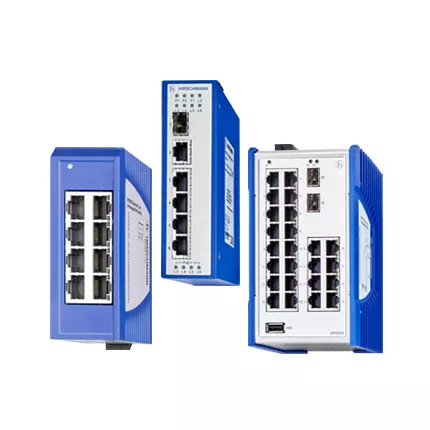
RS20 SDBE fiber switch: asset and sourcing dossier
RS20-1600M2M2SDBE is the complete Hirschmann designation for an unusual-suffix sixteen-port multimode replacement inquiry. This new RS20 SDBE fiber switch article gives engineers and buyers a model-specific record for interface verification, maintenance planning, lifecycle review, and quotation.
Keep every character in the equipment list and RFQ. A family description helps search, but it cannot prove the exact port media, connector, software, environment, approval, or revision.
Nameplate Evidence
Review total port count, both M2 routes, multimode fiber grade, SC condition, optical loss, power, software level, version, environment, approvals, and lifecycle. Use RS20-1600M2M2SDBE exactly as shown. A small character or suffix change can identify another port, software, environment, approval, or customer-specific requirement.
- SDBE label
- Port photographs
- Terminal wiring
- Suffix approval
Unusual Suffix Review
An unfamiliar suffix should trigger a label review before anyone assumes it behaves like a common catalog variant. The product belongs to the Hirschmann RS20 multimode SC family and is a fanless managed Fast Ethernet DIN-rail switch with two multimode SC optical uplinks. A standard 1600 M2M2 layout uses fourteen local 10 or 100 Mbit/s RJ45 ports and two 100BASE-FX multimode SC uplinks. A 2400 layout increases local port density.
Compare every suffix character with the label and old purchase record. Afterwards, attach photos of ports and terminal blocks to the RFQ. Treating SDBE as a standard suffix without evidence can produce the wrong commercial target. Keep this evidence with the asset record and quotation request.
Commercial Request Package
Send HKXY Instruments the required quantity, destination, delivery date, old nameplate, application, and acceptable alternative policy. We can check availability, current price, lead time, export packing, and delivery options. Compare the result with the official Belden Hirschmann RS20 configurator.
RS20 SDBE fiber switch SDBE Acceptance
Complete a staged test. First, verify mounting, power, and startup. Next, test every local link and uplink. Then restore VLAN, management, alarm, and redundancy settings. Finally, save the accepted configuration, optical or cable measurements, and recovery result.
Related Hirschmann RS20 Models
These configurations can support a spare or migration discussion, but they are not automatic substitutes. Compare port count, connector type, fiber mode, link reach, software, environment, approvals, and complete suffix.
- RS20-2400M2M2SDAEHH
- RS20-2400M2M2SDAEHH04.1
- RS20-2400M2M2SDAUHH
- RS20-1600M2M2SDAEHH
- RS20-1600M2M2SDAEHH09.1.00
Lifecycle And Migration Position
Belden currently lists the RS20, RS30, and RS40 configurator as Limited Availability or Passive and points to BOBCAT as a replacement route. Exact-code supply therefore needs a current check. Any successor should be reviewed for ports, fiber, connectors, power, mounting, software features, security, approvals, and configuration migration.
Get Hirschmann RS20 stock and price
Contact HKXY Instruments for RS20-1600M2M2SDBE model checking, lifecycle review, delivery time, and quotation support.
Official reference data:
Technical specifications
Contact us:
Request a quotation